 Identity Card
 National Identity Document
 Citizenship ID
 Unique Identity Document
 Personal Identification Document
 Unique Population Registry Code
 Personal Identity Card
 Civil Identity Card
 Identity and Electoral Card
 Check Plate Colombia
 Check Plate Peru
 Check Plate Mexico
 Check Plate Argentina
 Check Plate Chile
 Check Plate USA
 Check Plate Brazil


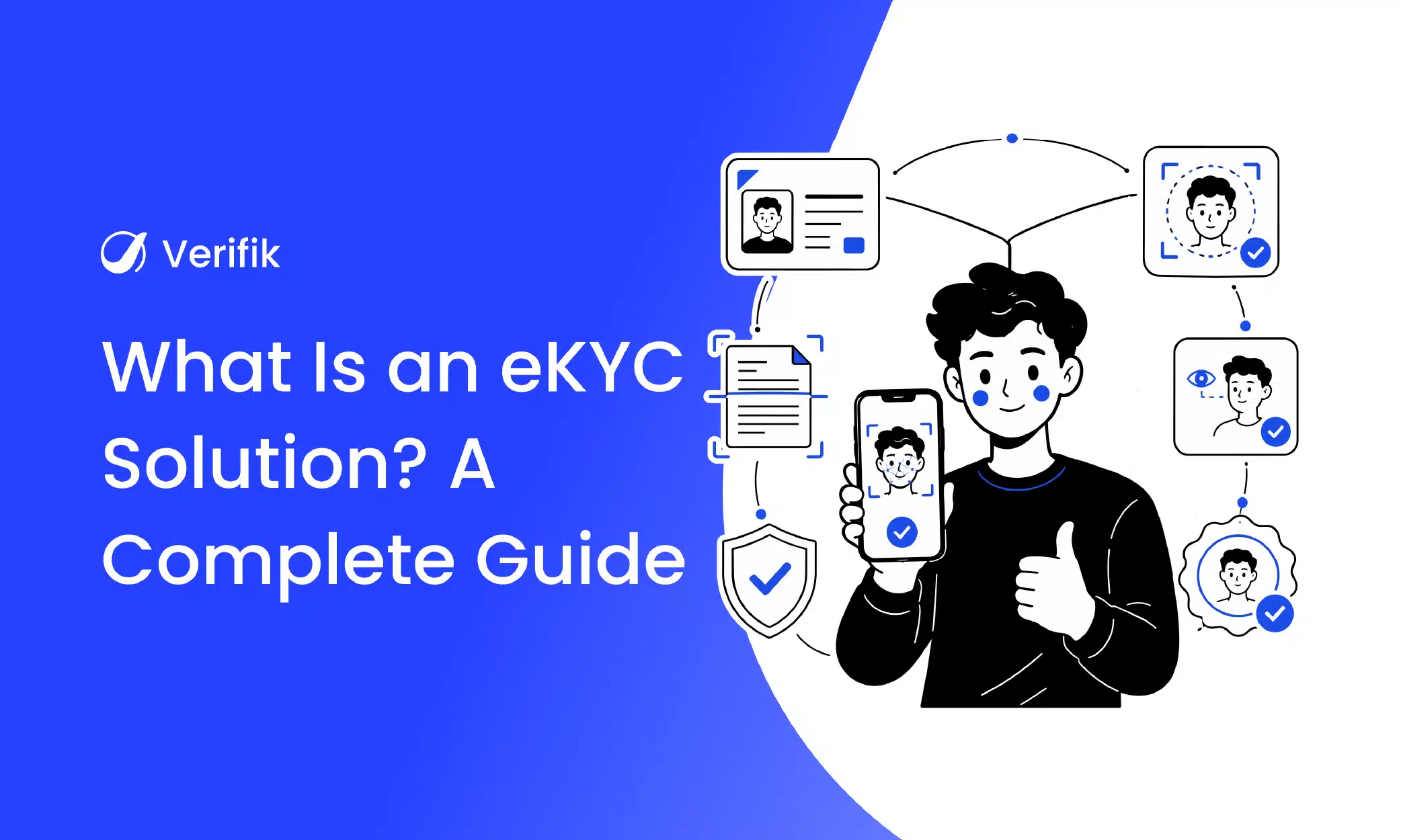
An eKYC solution verifies a customer’s identity electronically, using a photo of their ID, a selfie and checks against official sources, so a regulated business can onboard them remotely and keep evidence for its regulator. This guide explains how the eKYC process works step by step, the features a modern solution needs, the benefits over paper KYC, and the API calls behind each step. Updated November 2026.
What an eKYC solution is
KYC (know your customer) is the legal duty of banks, fintechs, insurers, crypto platforms and other obliged entities to identify their customers and assess their risk. eKYC is the same duty done electronically: instead of a branch visit and photocopies, the customer submits a document image and a selfie, and software validates them in seconds. Some countries define eKYC more narrowly; India’s RBI, for example, uses the term for Aadhaar-based authentication by OTP or biometrics (RBI KYC Master Direction). In Latin America the term usually covers any remote, non-face-to-face identification that meets local AML rules.
eKYC is one part of digital onboarding: onboarding also includes the sign-up form, consents and account setup. For a side-by-side, see eKYC vs traditional KYC.
Want to try it? Create your Verifik account and make your first call today.
Why businesses are moving to eKYC in 2026
- Customers abandon slow flows: 60% of European consumers in Signicat’s 2026 study gave up on an online financial application in the past year, often because verification took too long (Signicat via Cybersecurity Insiders).
- Fraud is synthetic: deepfakes are linked to about one in five biometric fraud attempts and injection attacks grew about 40% year over year (Entrust 2026). Visual inspection cannot catch them.
- Regulators now specify remote identification: Colombia’s SFC Circular Externa 006 de 2025 sets minimums for biometrics in non-face-to-face channels (SFC), and Mexico’s CNBV requires banks to verify biometrics against INE or SRE records (DOF, 1 July 2026).
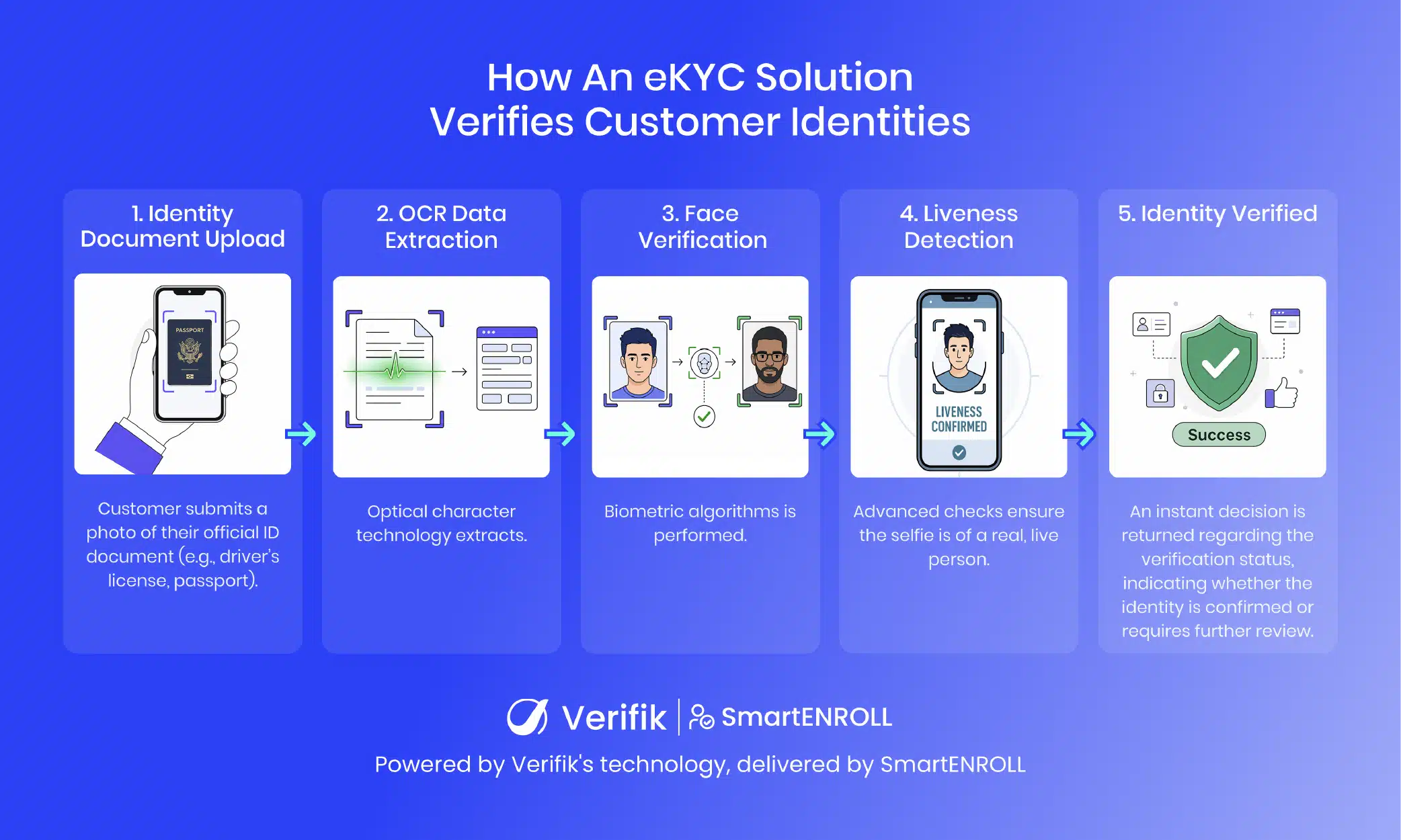
How the eKYC process works, step by step
- Collect basic data and consent. Name, phone or email and permission to process personal and biometric data.
- Capture the identity document. The customer photographs the front (and back, if needed) with guidance against glare and blur.
- Extract data with OCR. Verifik’s Scan Studio v3 (
POST /v3/ocr/scan-studio) returns normalised fields with confidence scores; v2 is retired on 25 November 2026 (docs). - Check liveness. Passive liveness confirms a live person, not a photo, screen or mask (
POST /v2/face-recognition/liveness, docs). - Match the face. A 1:1 comparison between the selfie and the ID portrait (
POST /v2/face-recognition/compare, threshold 0.67–0.95, default 0.85, docs). - Validate with official sources. The document number and name are checked with the issuing registry; Verifik covers 20 countries (guide).
- Screen sanctions and watchlists. OFAC, PEP and local lists, at onboarding and periodically.
- Decide and keep evidence. Approve, step up or send to review, and store every evidence ID for audit.
The liveness call and its response
curl -X POST "https://api.verifik.co/v2/face-recognition/liveness" \
  -H "Content-Type: application/json" \
  -H "Authorization: Bearer $VERIFIK_TOKEN" \
  -d '{ "os": "ANDROID", "image": "<base64 selfie>", "liveness_min_score": 0.6 }'
{
"id": "JQ4RM",
"data": { "passed": true, "min_score": 0.6, "liveness_score": 0.98 },
"signature": { "message": "Certified by Verifik.co", "dateTime": "January 16, 2024 3:44 PM" }
}Read data.passed for the decision and keep data.liveness_score for tuning. Capture quality matters: the face box should be at least 224×224 pixels with 80 pixels between the pupils and no more than ±30° of pitch or yaw.
The whole eKYC flow in one function
This server-side Python example runs OCR, liveness, face match and OFAC screening in order and returns a decision with evidence IDs:
import os, requests

API = "https://api.verifik.co"
H = {"Content-Type": "application/json",
     "Authorization": f"Bearer {os.getenv('VERIFIK_TOKEN')}"}

def post(path, body):
    r = requests.post(API + path, json=body, headers=H, timeout=60)
    return r.status_code, r.json()

def ekyc(id_front_b64, id_portrait_b64, selfie_b64, document_type="CC"):
    # 1. Read the ID (Scan Studio v3; v2 is retired on 25 Nov 2026)
    code, doc = post("/v3/ocr/scan-studio", {"image": id_front_b64, "documentType": document_type})
    if code != 200:
        return {"decision": "retry_capture", "step": "ocr", "detail": doc}
    number = doc["data"].get("documentNumber", "").replace(".", "")

    # 2. Liveness on the selfie (PAD, default threshold 0.6)
    code, live = post("/v2/face-recognition/liveness",
                      {"os": "ANDROID", "image": selfie_b64, "liveness_min_score": 0.6})
    if code != 200 or not live["data"]["passed"]:
        return {"decision": "review", "step": "liveness", "evidence": live.get("id")}

    # 3. 1:1 face match: selfie vs. ID portrait (threshold 0.67-0.95, default 0.85)
    code, match = post("/v2/face-recognition/compare",
                       {"probe": [selfie_b64], "gallery": [id_portrait_b64],
                        "search_mode": "ACCURATE", "compare_min_score": 0.85})
    if code != 200 or match["data"]["score"] < 0.85:
        return {"decision": "review", "step": "face_match", "evidence": match.get("id")}

    # 4. Sanctions screening (OFAC SDN)
    r = requests.get(API + "/v2/ofac", headers=H, timeout=60,
                     params={"documentType": document_type, "documentNumber": number})
    if r.ok and r.json()["data"].get("foundInOFAC"):
        return {"decision": "reject_and_escalate", "step": "sanctions", "evidence": r.json().get("id")}

return {"decision": "approve", "evidence": [doc.get("id"), live.get("id"), match.get("id")]}10 must-have features of a modern eKYC solution
| Feature | Why it matters | What to ask |
|---|---|---|
| OCR for local documents | Removes typing and transcription errors | Which document types and countries are read? |
| Certified liveness detection | Stops photos, replays and masks | Which certification (e.g. iBeta Level 2, ISO 30107-3)? |
| Face matching 1:1 | Proves the person holds their own ID | Can I set the threshold per product? |
| Face search 1:N | Stops the same face under other names | Is search scoped to my users only? |
| Official-source validation | Catches synthetic identities | Direct registry access in which countries? |
| Sanctions and PEP screening | AML requirement | Which lists, and how often are they updated? |
| Injection-attack defences | Deepfakes bypass the camera | How is the capture protected? |
| Audit trail | Regulators ask for evidence | Is every check stored with an ID and timestamp? |
| Flexible API and hosted flow | Fits your stack and timeline | REST, SDKs, webhooks, hosted screens? |
| Reporting and scalability | Funnel tuning and growth | Dashboards per step; rate limits and uptime? |
A detailed buyer’s checklist is in how to choose an eKYC solution.
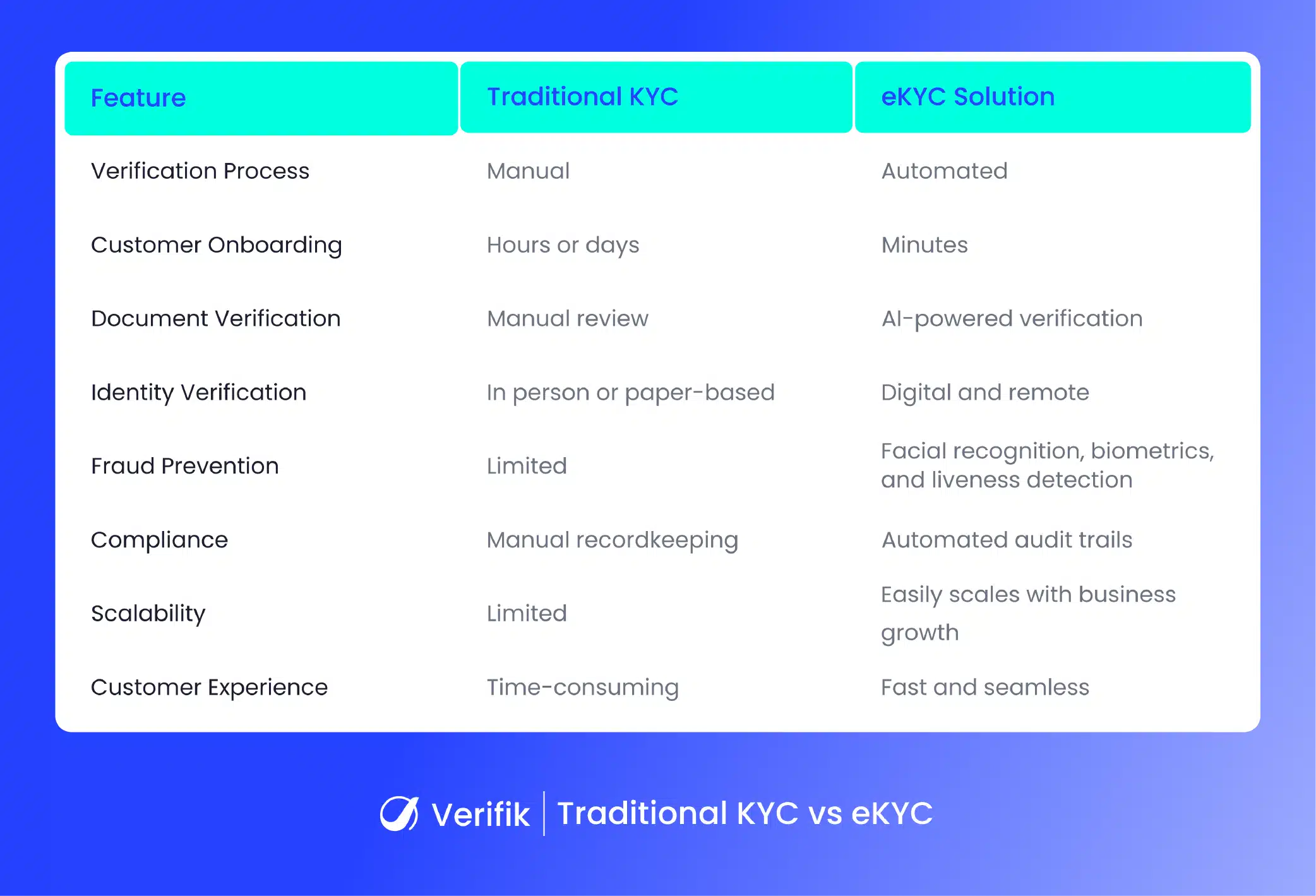
Benefits of an eKYC solution over traditional KYC
| Traditional KYC | eKYC | |
|---|---|---|
| Time to verify | Days | Seconds to minutes |
| Channel | Branch, courier, paper | Any phone, 24/7 |
| Fraud detection | Visual inspection | Liveness, face match, registry, 1:N search |
| Data quality | Manual entry | OCR and registry-confirmed data |
| Evidence | Photocopies | Signed, time-stamped records per check |
| Cost per customer | Staff time and logistics | Per-check API pricing; humans for exceptions only |
- Faster onboarding for most applicants, which raises completion.
- Stronger fraud prevention through layered biometric and data checks.
- Easier compliance because every decision has evidence attached.
- Lower operating cost as manual review shrinks to exceptions.
- Reusable identity: the enrolled face can re-authenticate the customer later.
- Reach: serve customers far from any branch.
Industries that use eKYC
| Industry | Typical use |
|---|---|
| Banking | Account opening and credit; see eKYC for banks |
| BNPL and lending | Instant credit at checkout with duplicate-applicant checks |
| Fintech and payments | Wallet and card issuance |
| Insurance | Policy issuance and claims |
| Crypto | Exchange accounts with sanctions screening |
| Telecommunications | SIM activation; Colombia’s Ley 2573 adds anti-impersonation duties from 19 November 2026 |
| Healthcare | Patient identity for telemedicine and benefits |
Common mistakes when adopting eKYC
- Choosing on price per check alone instead of pass rates on your own customers.
- Skipping liveness and relying on face match, which photos and replays can beat.
- Ignoring local document coverage in the countries where you actually operate.
- Treating compliance as the only goal, which ends in strict, slow flows; see eKYC compliance requirements.
- No plan for exceptions: people who cannot complete biometrics need an alternative path.

smartENROLL: Verifik’s eKYC solution
smartENROLL runs the whole eKYC process above, hosted or via API: Scan Studio OCR, iBeta Level 2 liveness, 1:1 and 1:N face matching, registry validation in 20 countries, OTP and sanctions screening, with signed evidence per customer. Book a demo to see it with your documents and risk rules.